

When using React Native to write mobile apps, JavaScript is the primary programming language. However, sometimes, you may want to call a platform API that is not supported by existing React Native component or use a third-party Android library for these cases, you need to write native code for bridging using Android Studio and Xcode. In this article, I will demonstrate how to create the simplest React Native Bridge module step by step.
Requirements to build Package for React Native Bridge
- Android Studio
- React-Native CLI
- Node
We are creating a bridge/package for React Native to access Toast (From Android Native) using JavaScript.
For creating any package first we need to setup the basic directory structure so, let us create the directory structure as below.
- Create Package Directory:
mkdir react-native-android-toast
- Run the following command to initiate the package:
cd react-native-android-toast

npm init
When you run the npm init it will ask you about the package. Enter all the information related to the package and it will create package.json file.
Now you have to create one android directory and one index.js file.
- Android directory will contain the all java/native code.
- index.js file is our entry point for a package as we have mentioned in package.json file also this file create the bridge between the Javascript and Android.
Once the basic directory is setup now we have to setup the android to write java/native code create the android directory structure as below

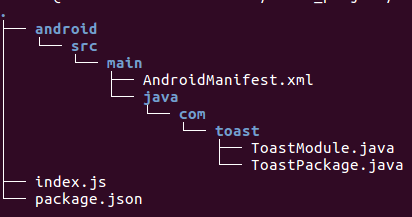
- AndroidManifest.xml: Mani fest file for an android application is a resource file which contains all the details needed by the android system about the application.
ToastModule.java:
- ToastModule extends ReactContextBaseJavaModule class and implements the functionality required by the JavaScript.
- All the React methods will be written as @ReactMethod, we have created the method show() which we are going to access from the javascript.
- If you want to create the more methods you can, you justhave to write only @ReactMethod before the method definition as React will understand that this method will be invoked from the javascript.
ToastPackage.java
ToastPackage is used to register the module. Just copy the code into your ToastPackage.java file and change as per your requirements.
Index.js
This file is used to wrap the native module in a JavaScript module.
A NativeModule is a Java class that usually extends the ReactContextBaseJavaModule class and implements the functionality required by the JavaScript.
This is basically used to call our module from the javascript.
So far, we have successfully setup the Android and JavaScript communication bridge.
How to use this package into our Project?
Create a React Native project: react-native init Example.
Since all Node modules should be installed under {React Native project}\node_modules\.
Simply add your package directory name into the React Native Project’s package.json file and path of your Package and run the following command to use into your project.
npm install

react-native link
react-native link command will link your package into your project and you are ready to access the toast from javascript.
Now Just import that package into your JS file where you want to show the toast into your project.
Here, we are calling the Native Method from ReactNative.
ToastModule.show("Hello World");
That’s it! Run your project and use toast anywhere into your project.
Click here for more blogs…
At BoTree Technologies, we build enterprise applications with our ReactNative team of 10+ engineers.
We also specialize in Ruby on Rails, Python, RPA, AI, Django, NodeJS and ReactJS.