

In this digital world, mobile app security has become a critical concern for individuals and organizations. Recent statistics show that a staggering 83% of mobile apps contain at least one security vulnerability. The same report also shows that 95% and 91% of Android and iOS apps have security vulnerabilities.
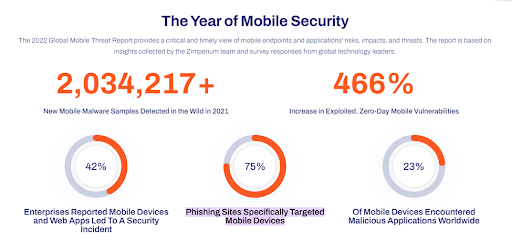
Additionally, another report shows that 75% of phishing attacks target mobile devices, and 23% of mobile devices worldwide have malicious applications installed.

While you need to use a holistic security approach to make your mobile apps resistant to cybersecurity threats, you can also minimize their risk using React Native. It’s a popular framework that comes with several security features to ensure data protection in mobile apps.
In this article, we’ll detail the biggest mobile app security challenges. We’ll also discuss how React Native can help you improve the security posture of your apps to ensure data protection.
Challenges In Mobile App Security
Here’s a list of the most common and damaging mobile app security challenges that you need to know.
- Unencrypted Data Storage and Transmission
- Strong encryption is essential for protecting data in mobile apps. Weak encryption makes it easy for cybercriminals to hack an app, and its consequences can be devastating. It’s especially true if the app handles data from multiple sources. When the app data is not encrypted, attackers can tamper with inputs like cookies and environment variables, leading to security breaches.
- A notable example highlighting the consequences of weak encryption is the Starbucks mobile app incident. Hackers stole addresses, usernames, and passwords of Starbucks mobile users as this information was available in simple text, which allowed them to siphon money.
- While it’s possible for end-users to enhance encryption by utilizing a VPN (Virtual Private Network) app on their mobile phones, not all individuals take advantage of this security measure. Therefore, developers must use powerful encryption protocols to protect app data (both in the database and transit).
- Poor API Protection
- During the mobile app development process, developers need to use different APIs. It allows the app to access the required data from different resources. For instance, a travel booking website must use an API that brings information from different airlines and hotels.
- It’s important to note that these APIs provide access to valuable and structured information, precisely what bad actors seek. They use advanced tactics like reverse-engineering the API to discover the endpoints used by the app.
- It allows them to get their hands on sensitive information that they can use to damage your organization. That’s why you must never overlook the importance of API protection. Otherwise, you’ll leave your app vulnerable to exploitation and unauthorized access by malicious online actors.
- Device Fragmentation
- Device fragmentation refers to testing applications on different types of mobile devices, each with unique features. It makes it challenging to identify security vulnerabilities specific to a certain device, which means that performance testing becomes difficult as well.
- As a result, the testing team often becomes a bottleneck in the release process, as they cannot test new app releases as quickly as the development team produces them.
- Additionally, most apps are developed for popular operating systems like Android and iOS, but each OS has multiple versions containing its own set of vulnerabilities. It also means that application testers must stay updated on the latest vulnerabilities associated with different OS versions, making the testing process time-consuming.
- Identifying the target audience, choosing the right reference devices, and making mobile device groups are some of the best strategies to overcome this issue.
- Hardcoded Passwords
- Hardcoding keys or passwords is a common yet critical mistake many app developers make. To simplify application implementation, support, or debugging, developers often explicitly write down OAuth keys and/or API keys directly in the code.
- Unfortunately, this practice leaves sensitive information vulnerable. When an attacker reverse-engineers the app and uncovers these hardcoded values, it opens the door for various forms of exploitation.
- This simple yet dangerous oversight can lead to unauthorized access, data breaches, and other cyberattacks. To mitigate this issue, developers should avoid hardcoding passwords and implement secure data storage and retrieval mechanisms.
- Client-Side Injection
- Client-side injections allow bad online actors to gain unauthorized access to the app. They send manipulated data that is interpreted as executable code by the app.
- One common form of client-side injection is SQL injection, where an attacker inserts malicious queries into a mobile SQL database, potentially retrieving sensitive data belonging to other users.
- However, SQL injections are not the only type of client-side injection. Attackers can also use Local File Inclusion, which involves uploading a malicious executable file on the app, which can lead to app crashes or the exposure of sensitive data.
- You can utilize the power of input sanitization and validation techniques, use parameterized queries, and enforce strict file-handling rules to address this problem.
- Poor Server-Side Controls
- While the client side of a mobile app encompasses the user interface and functionality, it relies on the server side to ensure smooth operation. The server side manages the app’s functionality and facilitates communication between the client and server through an API.
- Hackers target server-side vulnerabilities, especially when you’re using insecure third-party APIs. These vulnerabilities can include:
- Code logic flaws
- Access control vulnerabilities
- Insecure server configurations
- Improper session management
- It is important to note that these vulnerabilities can fall into two main categories: code vulnerabilities and configuration vulnerabilities.
- Code vulnerabilities refer to flaws or weaknesses within the server-side code, making it susceptible to exploitation. Whereas configuration vulnerabilities arise from incorrect or poor server configurations, leading to potential security breaches.
- Addressing access control vulnerabilities, using secure server configurations, enforcing proper session management, and conducting thorough code reviews are effective ways to minimize these challenges. Lastly, adding an SPF record checker to your email system can boost email security by stopping unauthorized sources from sending fake emails using your name.
- Inefficient Authentication/Authorization Controls
- If authentication schemes are missing or poorly implemented, attackers can exploit these flaws and execute malicious functionalities within the app. It can help them gain unauthorized access to the backend server, which can be catastrophic.
- Authentication requirements in mobile apps differ from traditional web applications, as users aren’t always required to be constantly online during their session. That’s why developers need to apply offline authentication methods, which can be risky if not implemented properly.
- It can allow hackers to gain unauthorized access to the app, leading to data theft, unauthorized modifications, or complete compromise of backend services.
- To address this challenge, developers must consider the unique requirements of each mobile app, including offline authentication needs.
- Additionally, proper authorization mechanisms should be implemented to ensure that users are granted appropriate privileges based on their account type within the app.
Benefits of React Native for Data Protection
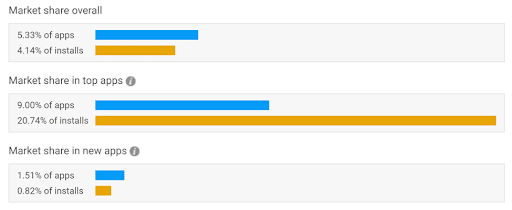
React Native is a popular JavaScript-based framework that allows you to develop native mobile apps. According to recent stats, more than 5% of apps available in the market are built on this framework. But it is an excellent choice for secure mobile app development because it offers many data protection benefits.

It provides you with a sandboxed environment for executing code, which enhances security and minimizes the risk of malicious attacks. Additionally, applications built on this framework are compiled into native code, making them more resistant to reverse engineering attempts.
There are many other built-in security features that React Native brings to the table, such as encryption and secure storage. These features help you protect your sensitive business data within the app.
Additionally, it also allows developers to incorporate third-party libraries to further increase the security of React Native apps. All these features make React Native an excellent option for developing mobile apps that ensure data protection.
Let’s discuss how React Native helps you with data protection in detail.
- Secure Sensitive Data Storage
- When it comes to storing sensitive data securely in React Native, you need to consider the type of data and its level of sensitivity.
- Storing Non-Sensitive Data
- For non-sensitive data, Async Storage is a popular choice. It provides unencrypted key-value storage available across the application and isolated within the app’s sandbox environment.
- Storing Sensitive Data
- For storing sensitive data such as authentication credentials or access tokens, using Async Storage alone won’t be enough because of its lack of encryption. To address this, you can turn to Secure Store, which offers encryption capabilities for storing sensitive information.
- On iOS, Secure Store leverages Keychain Services, a secure storage solution specifically designed for small chunks of sensitive data. Similarly, Android provides its equivalent called Shared Preferences (Encrypted Shared Preferences for data encryption).
- To integrate these secure storage options, you can use the following libraries:
Using “Secure Store” offers several advantages, including encryption of stored data and additional security measures. For instance, the device must be unlocked to access the keychain, and it’s not possible to restore the keychain to a different device.
In newer devices, encryption keys are stored at the hardware level, enhancing overall digital security.
Support for Universal Links
Deep linking is a feature that allows you to send data directly to a native mobile application from an external source. It uses a specific URL scheme, such as “app://,” followed by additional parameters that the app can use to handle the request internally.
For example, if you have an ecommerce app, you can use a deep link like “app://products/1” to open the product detail page for a product with ID 1. Deep links resemble web URLs but with a distinct purpose.
However, it’s important to note that deep links aren’t secure, and sensitive information should never be sent through them. This is because no centralized method for registering URL schemes allows hackers to exploit them.
Malicious applications can register the same URL scheme and intercept the data contained in the deep link. While harmless links like “app://products/1” might not pose a threat, sending tokens or other sensitive information is a security concern.
To address this issue, React Native provides support for Universal links. These standard web links point to content within the app and web pages simultaneously. By authenticating login tokens and implementing a universal login interface, you can minimize the risk of malicious login token replaying and hijacking.
Strict Mode for Deprecated Libraries
It’s critically important not to use insecure, deprecated libraries in your application. That’s because they can contain security vulnerabilities as they’re no longer supported. Additionally, they might not be compatible with other libraries or updates as well.
Not only will it keep your app free of security flaws (present in these libraries), but it’ll also help you avoid the hassle of migrating to new versions.
That’s where StrictMode comes into place. It helps you identify potential issues in your mobile application by activating additional warning systems and checks, even if it doesn’t render any visible UI.
It means that you’ll be able to detect components in your app with unexpected side effects and unsafe life cycles to have a more secure, reliable, and reusable code.
Important Note: Ideally, you must always opt for third-party libraries that are maintained actively.
- SSL Pinning
- SSL pinning is a security measure that allows you to prevent MITM (Man in the Middle) attacks and enhances data protection in your application. SSL encryption encrypts the data transmitted between the server and the client so that no bad online actor can intercept and read it.
- In React Native, SSL pinning involves converting certificate files to (.cer) format and including them as assets in the mobile app bundle.
- Some libraries used for consuming APIs in React Native might not support SSL pinning. However, alternative plugins are available, such as react-native-pinch and react-native-ssl-pinning, to address this problem.
- For HTTP public key pinning, you can consider plugins like react-native-trustkit and react-native-cert-pinner.
- To further enhance data security, you can use refresh tokens and access tokens for secure connections. Refresh tokens allow you to get a new token if the last one has expired, whereas access tokens are used to call other endpoints.
- Secure Authentication
- Secure authentication in React Native involves using the OAuth 2.0 authentication protocol with third-party authentication services.
- However, the default redirects used in web apps might not be secure for mobile applications due to the absence of a centralized method for registering URL schemes.
- To address this security problem, you can implement PKCE (Proof of Key Code Exchange), pronounced as “pixy.” It uses the SHA-256 algorithm to securely encrypt the verification code by adding a cryptographic layer for secure authentication.
- This way, you can ensure that token exchange and authentication requests originate from the same client.
- Security Checks for Rooted Devices
- Rooted and jailbroken devices have root privileges, which allow users to bypass operating system security measures, manipulate data, analyze algorithms, and access protected storage. Generally, it’s best to avoid running apps on rooted devices.
- To address this security issue in React Native, you can utilize libraries like SafetyNet and JailMonkey.
- SafetyNet is an Android-specific API that helps you detect bootloader unlocked and rooted devices. JailMonkey also performs the same functionality, but you can also use it for iOS to detect jailbroken mobiles. Additionally, it can also detect if mock locations are being used through developer tools.
- If you want to know if an app is running in an emulator, you can use the react-native-device-info library.
Important Note: It’s important to note that SafetyNet will be replaced by the Play Integrity API on June 30, 2024. However, if your application(s) is/are already using it, you need to migrate to the new API by June 30, 2023. Failure to migrate by that date will result in API errors.
Other Benefits of Using React Native
Here are some other advantages of using React Native for mobile app development.
- Complex Mobile Applications: React Native’s component-based interface allows you to create intricate and advanced mobile applications easily. The framework simplifies complex algorithms and converts them into manageable formats, making development easier.
- Open Source: Being an open-source framework, React Native allows you to access and modify its code freely. The availability of existing libraries and tools compatible with React Native further enhances its flexibility and functionality.
- Reusable Code: React Native allows you to reuse code for Android and iOS platforms, thanks to its compatibility with JavaScript. This code reuse significantly improves efficiency, speeds up development, and reduces costs.
- Enhanced Flexibility: When you’re working with React Native, you can use code written by other developers. It improves productivity and facilitates modifications and updates to mobile apps.
- Minimal Resources Needed: The extensive component library and multi-platform support of the platform reduce the amount of work and time required to develop an app. Writing a single codebase for multiple platforms ensures consistency and ease of operation across different devices.
- Third-Party Library Support: There’s a wide range of third-party libraries that the framework supports. It allows you to add features and functionality to mobile apps, which enhances the development process and improves app performance.
- Exceptional Community Support: React Native has a large community that helps you solve problems and receive assistance throughout the app development.
Final Words
Mobile app security is a crucial aspect that should not be overlooked in today’s digital landscape. Otherwise, you’ll need to face detrimental consequences like damaged reputation, financial losses, and compromised customer data sooner or later.
While it’s critically important to follow the best security practices while developing mobile apps to ensure security, you can also use the React Native framework for improved data protection. It’ll also bring many other benefits to offer a better mobile app experience.
Contact us today for a free consultation.